Chase a Storm Controls & HUD Tips
Drive, film, and upgrade with fewer wipes—PC, mobile, and gamepad habits for Chase a Storm.
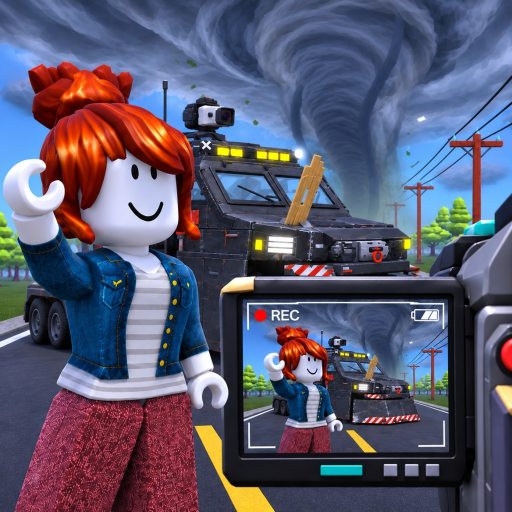
Mastering controls and HUD in Chase a Storm! matters as much as unlocking Dominus 2 or Siv 2. This guide covers general Roblox input on PC, mobile, and gamepad, then Chase-specific habits: driving the truck, filming with the camcorder, watching battery, surviving debris and lightning, and upgrading between chases. Pair it with the Players Hub for co-op roles and the Guides Hub for broader chase strategy.
Chase a Storm is a co-op experience (up to four) from nonlethal studios. You race across farm country, film tornadoes for Storm Points, and try not to get swept away. Inputs feel familiar if you have driven other Roblox vehicles—but the camcorder battery and storm timing add a second layer of focus.
PC (keyboard & mouse)
Typical Roblox vehicle patterns apply; always confirm in-game prompts after a patch:
- Move / steer: WASD or arrow keys while seated in the truck.
- Camera: Mouse look; adjust sensitivity in Roblox Settings if film framing feels jittery.
- Interact / enter vehicle / prompts: E or the on-screen context key shown in tutorials.
- Shift / sprint equivalents: Use only when on foot between truck and gear interactions—do not confuse with vehicle boost if your build lacks one.
- Menu / pause: Esc or the Roblox menu button to reach Settings; hunt for Codes there when promos exist (Codes Hub).
PC tip: Rebind only after you finish a clean Day 1. Muscle memory beats fancy layouts during your first wedge encounter.
Mobile (touch)
- Use the dynamic joystick for driving; keep thumbs low so storm UI stays visible.
- Pinch or use the camera thumb pad to frame tornadoes while a teammate drives when possible.
- Tap clearly labeled action buttons for camcorder start/stop and enter/exit—avoid frantic multi-taps that cancel film.
- Lower graphics slightly if hail and debris tank your frame rate; stable 30+ fps helps abort timing more than max settings.
- Consider a compact co-op plan: one driver, one dedicated camera operator. Dual roles on a small phone screen invite battery misclicks.
Gamepad / controller
- Left stick steer, triggers or face buttons for accelerate/brake depending on Roblox vehicle defaults.
- Right stick for camera—practice slow pans while a cone tornado tracks across fields.
- Use the Roblox button combo to open the escape menu for Settings and any Codes entry field.
- Remap in Roblox Settings if your controller swaps bumpers awkwardly with camcorder actions.
- Vibration (if enabled) can distract during lightning; disable it for precision intercept practice.
Chase-specific: drive loop
- Seat check — Confirm you are the assigned driver before the storm spawns momentum.
- Approach lane — Pick a road or field line that keeps an exit away from the core.
- Hold the arc — Film distance is a moving sweet spot; do not tunnel-vision the funnel.
- Debris discipline — Micro-correct instead of yanking the stick; big swerves flip trucks.
- Abort early — If the funnel jumps category feel (especially fire or multi-vortex), peel out and keep the points you already banked.
Vehicle choice changes forgiveness—see Vehicles & interceptors and the Tier List Hub. Starter trucks punish greed; Dominus-line rides still die to bad exits.
Chase-specific: camcorder & battery
- Start filming when the tornado is clearly the subject—not every dark cloud.
- Watch the battery indicator as closely as speed. Empty battery mid-orbit wastes positioning.
- Coordinate: operator calls “filming” and “battery half” so the driver can shorten the route.
- After a successful pass, stop the camcorder deliberately; idle recording drains future opportunities.
- Between chases, prioritize upgrades that extend battery or film value if your failure mode was empty power, not crashes.
Storm Points come from getting the shot. Surviving without footage is only half a win.
HUD checklist before each chase
| Check | Why |
|---|---|
| Battery level | Avoid committing to long rain-wrapped orbits empty |
| Crew roles | Driver / cam / spotter agreed |
| Day / Season goal | Badge hunting vs safe points |
| Tornado type read | Rope vs wedge vs fire changes risk |
| Upgrade backlog | Know what you will buy if the run pays |
Spotters should watch for lightning tells and call left/right early—lightning-strike badges are cool, repeated strikes that wipe the truck are not. Mystery ??? and encounter badges are covered conceptually on Season 2.
Between chases: upgrade rhythm
Chase a Storm expects you to upgrade the truck and gear between chases. Do not queue the next day on adrenaline alone:
- Bank Storm Points from the film run.
- Open the upgrade flow in the lobby / between-chase bay.
- Fix the last wipe cause (handling, toughness, camera gear).
- Recheck controls if a patch rebound actions—see Updates.
- Ready check the crew, then deploy.
This rhythm matters more than any third-party macro. Skip unsafe tools described on the Scripts Hub.
Common input mistakes
- Filming while driving solo on mobile without lowering camera sensitivity.
- Holding full throttle into debris instead of feathering.
- Ignoring battery because the Dominus “feels tanky.”
- Opening the Roblox menu mid-orbit and losing camera lock.
- Never practicing aborts before a badge attempt.
Drill aborts on calmer rope or cone days first. Then take Getting Started habits into Season content.
Related pages
Frequently Asked Questions
Quick answers for Chase a Storm chasers.
What are the default Chase a Storm controls?
Chase a Storm uses standard Roblox vehicle and camera patterns (WASD/joystick drive, mouse or right-stick look, context interact). Always confirm on-screen prompts after updates because Season patches can tweak UI labels.
How do I use the camcorder without draining battery?
Film only when the tornado is clearly framed, call battery milestones with your crew, stop recording between passes, and upgrade battery-related gear between chases.
Is mobile viable for intercepts?
Yes for film-focused play, especially with a dual role split. High-risk Dominus intercepts are easier on PC or gamepad where steering precision is higher.
Where do I upgrade the truck?
Between chases in the upgrade bay / lobby flow. Spend Storm Points on the failure mode you just hit before starting the next day.
How do I open Codes from the HUD?
Use the Roblox or in-game Menu/Settings entry and look for a Codes or Redeem control. Labels can vary—see the Codes Hub for current promo status.
Should the driver also operate the camcorder?
Solo players must, but co-op crews should split roles. A dedicated operator protects battery and framing while the driver holds the arc.